You didn't perfect your transitions for 10 years to waste an afternoon on text alignment.
A 2-hour DJ mix set has 30 tracks. Maybe 40. Each one needs a lower third: artist name, track title, album, label. Placed at the exact moment the track starts. Styled consistently. Aligned to the beat. Branded with your identity.
Do it manually, and you're looking at 3 to 4 hours of repetitive timeline work. Per video. Every single time. Not creative work — mechanical work. The kind that makes you question why you started editing in the first place.
And it gets worse. Change one font? Re-do every lower third. Adjust timing by two seconds? Drag 30 clips. Swap your DJ logo? Start over.
This is the manual-edit tax. Every DJ video editor pays it. Most accept it as the cost of doing business.
The Numbers
30+ tracks per average mix set
3–4 hours of manual editing per video
4 text fields per lower third
One mistake = cascade of fixes
The Pain Points
Repetitive placement on timeline
Inconsistent styling across tracks
No batch operations in Resolve
Logo changes require full rebuild
The Hidden Cost
Creative energy wasted on mechanics
Fewer videos published per month
Quality drops when you rush
Burnout from repetitive work
The Alternative
Import a playlist file
Map your fields once
Click Build
60 seconds. Done.
Bottom line: The manual-edit tax is not a rite of passage. It is a problem with an engineering solution.
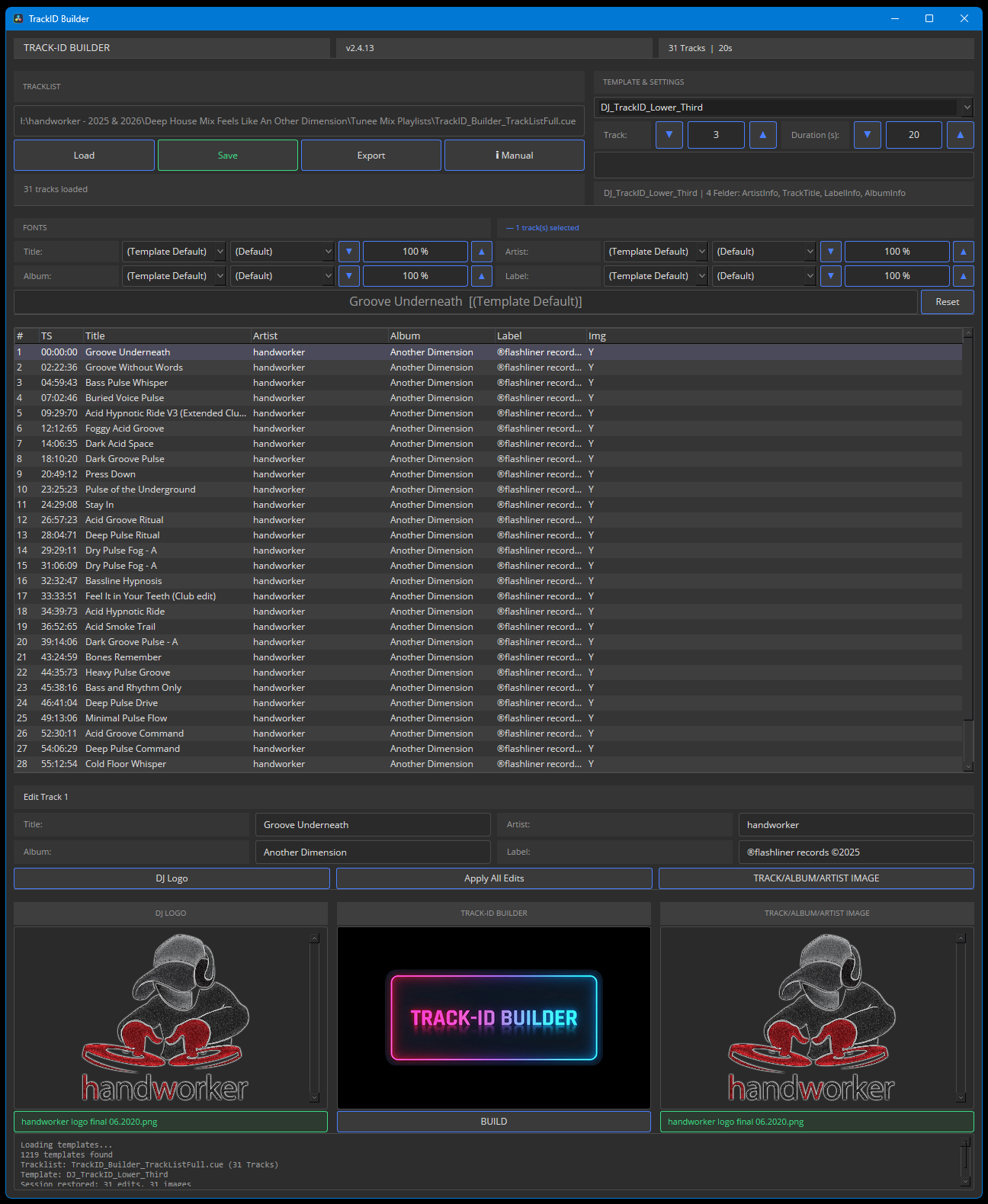
Load your playlist or cue sheet. .cue, .m3u, .csv, .pls, .xspf, .txt — all supported.
2
Map
Confirm fields — Title, Artist, Album, Label. Fix anything in one editable table.
3
Brand
Add your DJ logo once. Optionally add per-track artist images. Dual branding.
4
Style
27 fonts, 9 styles. Set sizes per field. Override per track. Live preview.
5
Build
One click places every lower third at the correct timeline position. Done.
TrackID Builder reads the files DJs actually use. Every timestamp, every artist, every track title — parsed and ready. Map the fields to your template, add your branding, style globally or per track, and press Build.
Rebuild is safe: only TrackID Builder clips are replaced. Your cuts, transitions, effects, and audio — untouched.
Bottom line: Five steps because four would cut corners. One click because two would be a waste.
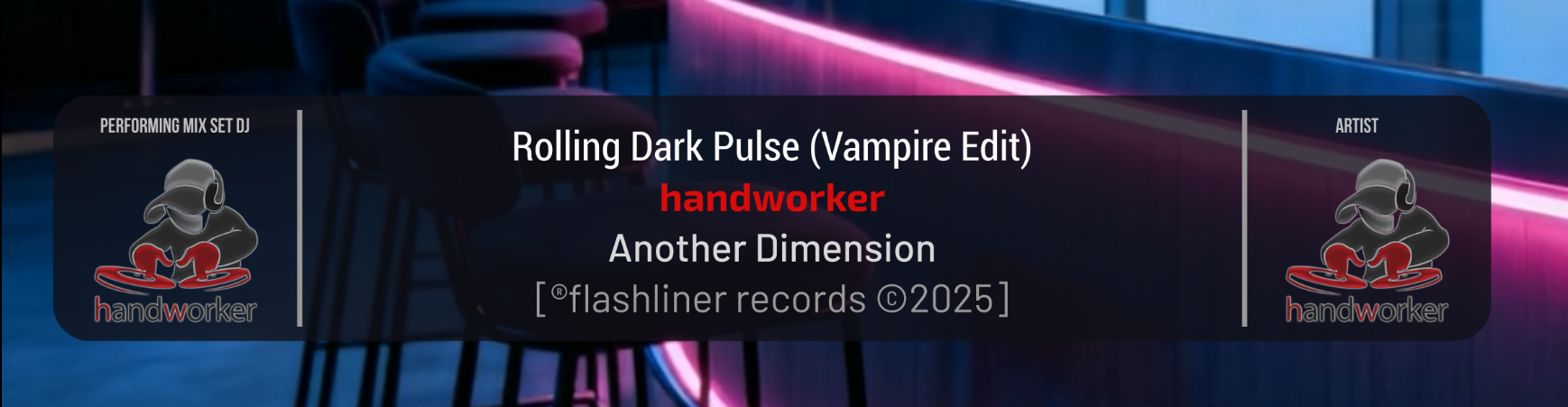
DJ-first lower third design: dual branding, four text lines, staged animation.
The included DJ lower third template is purpose-built for mix video production. It is not a generic text overlay repurposed for music. Every element exists because a DJ mix video needs it.
Left side: your DJ logo and a "PERFORMING MIX SET DJ" tagline. Your identity, present on every track. Right side: per-track artist image with an "ARTIST" tagline. Their credit, their visual.
Between the two: four text lines — Track Title (bold, white), Artist Name (bold, signature red), Album (medium, light gray), Label (regular, gray). Separated by vertical hairlines. All contained within a semi-transparent dark card that unfolds smoothly at the start and collapses at the end.
The animation is staged: dark card opens first, then text fades in line by line, then images appear. On exit, the reverse. Professional broadcast-quality motion, not a jarring cut.
One-time payment. No recurring charges. No hidden fees. Just the tool.
Start with a full-featured 7-day free trial. No credit card. No registration. No strings attached. Just install and go.
Early Bird — Limited Time
Early Bird
Yearly
12 months of full access
EUR29,90
one-time / 12 months
Regular price:EUR 39,90
7-day free trial included — no credit card needed
All features included
2 device activations
All playlist formats supported
Free updates during license period
Customer portal access
Silent auto-updates included
Pay Once. Own It.
You spent years perfecting your ear, your transitions, your sound. The last thing you need is a tool that charges you monthly for the privilege of saving time.
TrackID Builder is yours the moment you buy it. No recurring fees. No "pro tier" unlock. No feature gates. Every playlist format, every font, every template — included from day one.
One license. Two devices. Unlimited builds. The only thing that expires is the Early Bird price.
Best Value
Lifetime
Pay once, use forever
EUR79,90
one-time / forever
Regular price:EUR 119,00
7-day free trial included — no credit card needed
All features included
2 device activations
All playlist formats supported
Lifetime updates included
Customer portal access
Priority support
2 devices included (Desktop + Laptop) · No auto-renewal · No subscription traps You buy a license key. You own it. Your data stays on your machine.
What Happens After Purchase?
You'll be redirected to Stripe's secure checkout (card, PayPal, SEPA, and more)
After payment, you'll receive an email with your license key
A customer account is created automatically — check your inbox for login credentials
Download TrackID Builder, enter your key, and start building
Access your invoices and billing anytime via the Customer Portal
Bottom line: Early Bird pricing won't last forever. Lock it in now.
Change everything at once. Override anything individually.
Set your font, style, and size for the entire tracklist in one operation. Title in Roboto Condensed Bold. Artist in Exo 2 Bold. Album in Barlow Medium. Label in Barlow Regular. Choose from 27 Windows default fonts and 9 style variants. Scale any field from 50% to 200%.
Then, if one track needs special treatment — a featured artist with a longer name, a remix title that needs a smaller font — override it. Per-track font, style, and size overrides apply to individual entries without breaking the global settings.
Live preview shows exactly what your lower third will look like before you commit. No guessing, no build-test-undo cycles.
27 Fonts, 9 Styles
Windows default fonts, zero installation
Regular, Bold, Italic, Light, and more
Auto-fallback to Regular if style missing
Live preview with selected font
Size Scaling
50% to 200% per text line
Title, Artist, Album, Label independently
Auto-size for long titles
Unicode controls for precise adjustment
Per-Track Overrides
Individual font/style/size per track
Multi-select for batch edits
Reset button restores template defaults
Overrides survive session reload
Image Management
One DJ logo for the entire set
Per-track artist images optional
PIL-based thumbnail preview
Lanczos resampling for quality
Bottom line: Batch for speed. Override for precision. Both without rebuilding.
Not a plugin. Not an external tool. A Resolve script that speaks Resolve's language.
TrackID Builder runs inside DaVinci Resolve as a native Python script using Resolve's scripting API. It does not render externally and import. It does not generate SRT files and hope for the best. It creates Fusion compositions, places them on your timeline at exact frame positions, and lets Resolve handle the rendering.
Every lower third is a real Fusion comp with editable TextPlus nodes, animatable properties, and full Inspector access. After a build, you can open any clip in the Fusion page, adjust timing, change colors, or add effects — just like any other Resolve title.
The script discovers every installed lower third template on your system — 1219+ templates on a typical installation. Use the included DJ template or pick any title from your library.
Rebuild is safe: TrackID Builder tags its own clips with a TrackID: prefix. When you rebuild, only tagged clips are removed. Your cuts, transitions, effects, and audio — untouched.
Fusion Compositions
Real .comp files, not rendered overlays
Full Inspector access after build
Editable TextPlus nodes
Animatable properties
Timeline Placement
Frame-accurate positioning
Framerate auto-alignment
Target track selection (default V2)
Deterministic, repeatable results
Template Discovery
Auto-scan of all installed templates
1219+ templates on typical systems
Third-party lower thirds supported
Included DJ template optimized for mix sets
Safe Rebuild
Only TrackID Builder clips are removed
Your edits, cuts, and audio stay
Managed-clip tagging system
Rebuild without fear
Bottom line: TrackID Builder does not work around Resolve. It works with it. That distinction matters.
Track selection. Transitions. Mastering. That's the craft. The 280 text fields? That's a 60-second job now.
Manual Editing
~4 hours
TrackID Builder
~60s
98.5% Time Saved
TrackID Builder has been tested with a real-world 31-track CUE file from an actual DJ mix set. Import, map, brand, style, build — completed in approximately 60 seconds. The same task done manually takes 3 to 4 hours.
This is not a theoretical benchmark. It is a measured result from production use.
Bottom line: The math is simple. The decision should be too.
Everything a Mix Editor Needs. Nothing They Don't.
No feature bloat. No subscription trap. Just the tools that eliminate the manual-edit tax.
Duration Control
Set default lower third duration per project. Controlled through Resolve's "Standard still image duration" preference. Consistent timing across the entire set.
Export & Backup
Export your tracklist as CSV or CUE. Save your session state including all edits, fonts, images, and overrides. Resume exactly where you left off.
Multi-Select Editing
Ctrl+Click, Shift+Click, or Ctrl+A to select multiple tracks. Apply font, style, size, or image changes to all selected tracks in one operation.
Session Persistence
Tracklist, template choice, DJ logo, track images, duration settings, per-track edits, font selections — everything survives script restarts.
Built-In Manual
11-chapter manual with Quick Start guide, FAQ, and prominent documentation of the Resolve still-image-duration setting. No external docs required.
7-Day Free Trial
Download, install, and start building — right now. Full access to every feature for 7 days. No credit card. No registration. No feature limits. When the trial ends, you decide. Zero risk, zero commitment.
Silent Auto-Update
TrackID Builder updates itself. Every time you open the script, it checks for a new version — downloads and installs silently in seconds. No manual downloads. No reinstalling. Always the latest version.
Bottom line: Every feature exists because a DJ mix editor needed it. That is the only admission criteria.
Your download starts immediately after entering your email.
Almost there!
Enter your email to proceed to secure checkout. We'll send your license key and create your account automatically.
Almost Ready for Launch
We're putting the final touches on TrackID Builder — and it's going to be worth the wait. The full purchase flow is being tested right now. Stay tuned.